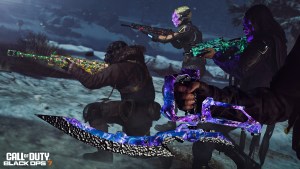
Just as we saw last year, viewers of the Black Ops 6 COD NEXT event can earn FREE rewards just by tuning into the stream. The Black Ops 6 COD NEXT rewards can be unlocked for viewers who watch the broadcast on the Call of Duty YouTube or twitch channel. Players will need to link their YouTube or Twitch account with their Activision ID to claim their rewards!

Don’t forget to also tune into dkdynamite’s stream LIVE from Washington D.C. where he’ll be getting hands on with Multiplayer, Warzone & Zombies!
COD NEXT STARTING TIMES
With COD NEXT recently being announced on August 28th, the official Call of Duty account will be going live at 12:30AM PT, 15:30PM EST & 8:30PM GMT. You can expect to see our stream go live around two hours earlier with @fajartys hosting a prestream discussing all things Call of Duty and chatting with you guys, with DK taking over the stream closer to the beginning of COD NEXT where Zombies, Multiplayer & Warzone will all be showcased.

HOW TO UNLOCK BLACK OPS 6 COSMETICS VIA COD NEXT STREAM
To earn these COD NEXT exclusive rewards, you must link your Twitch/Youtube account to your Activision & you must tune into the official Call of Duty stream on August 28th to progress through each reward by hitting a watchtime milestone. It’s currently unclear how long total you must watch the stream for, but it can be assumed that you need to watch for a total of 4-6 hours. There are four total rewards you earn by watching the COD NEXT stream, and they go as follows:
- EMBLEM – Mine (30 Minutes)
- CALLING CARD – Earning Stripes (60 Minutes)
- WEAPON CHARM – Tri Harder (90 Minutes)
- BLUEPRINT – The Redactor (120 Minutes)

HOW TO LINK YOUR YOUTUBE/TWITCH ACCOUNT TO ACTIVISION
To participate in the COD NEXT stream and obtain the rewards, you have to link your Activision account. To link your Twitch account to Activision, here’s what you do:
- Head over to Linked Accounts section on Call of Duty’s website and sign into your Activision account, if you don’t have an Activision account, you can create one by signing into your Xbox, Playstation or Steam account.
- After navigating to the Account Linking section, go to the Twitch Account and select Link, and upon signing into your Twitch account, you’ll be redirected back to the Call of Duty website and you have successfully linked your accounts.

To link your Youtube and Activision account together, here’s what you do:
- Head over to Youtube’s Account Sharing section and click “Connect” next to Activision ID, after signing into your Activision account you will be redirected to YouTube and you’re all setup.

To redeem and claim these rewards on Twitch, you must first have met the watchtime requirement for each specific reward. Once you’ve met the requirements for a reward, go to Twitch’s Drop & Rewards and your item will be shown under Drops with a “Claim” button. Repeat this for all 4 items and after signing into Black Ops 6 you will have the cosmetics.
To redeem and claim these rewards on YouTube, it’s much simpler, as you automatically unlock each reward as you hit the watchtime milestone. You’ll get a notification to let you know you’ve unlocked it.
THE END
And that’s how you unlock the 4 COD NEXT cosmetics for Black Ops 6, will you be earning them?
For a breakdown of the COD NEXT cosmetics, and other news relating to COD NEXT and the different modes involved, check out the video below:

Stay connected with any new updates on COD NEXT & Black Ops 6 as they release on our Twitter, and our YouTube Channel!